Online: 6405


 Online: 6405
By using setMonth() we can set the month of a date object.
<p>Click the below button to set the Month of a date object.</p>
<input type="button" value="Click" onclick="myDate()" />
<p id="myId"></p>

<script>
    function myDate() {
        var a = new Date();
        a.setMonth(9);
        document.getElementById("myId").innerHTML = a;
    }
</script>
In the above code snippet we have given Id as "myId"to the second <p> element in the HTML code. There is a function myDate() in the<script>block which is connected to the Onclick of the HTML button. The document.getElementById("myId")returns the element that has Id"id=myID" in the HTML page. We need to set the month of a date object, for that we are using setMonth(). Onclick of the button "Click" in the HTML code fires the function myDate() in the <script> block, at the same time setMonth() method sets the month of a date object and gives the output.
OUTPUT
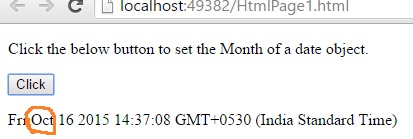
NOTE: We have given value 9, it returns October, so January=1, February=1, March=3,.........................,December=11.
Views: 5824 | Post Order: 122